Snapkin went live in the App Store on September 24th. It got there on the sixth submission. The first five came back rejected, with seven different reasons between them. 😅
Apple publishes its rules in the App Review Guidelines . Most rejections point to a numbered section in there, like 2.1 or 1.4.1. Most of mine were small, and Apple reads those rules very literally. A word in the wrong place, a link that was one tap too far away, a demo account that was too helpful. Here’s each one, with what I changed in the app to make sure it doesn’t come back.
Some context for the code below. Snapkin started as a PWA , a web app written in Svelte. Capacitor then turns that same code into an iPhone app and an Android app.
13 days, and most of it waiting#
It took 13 days from the first submission to the app going live.
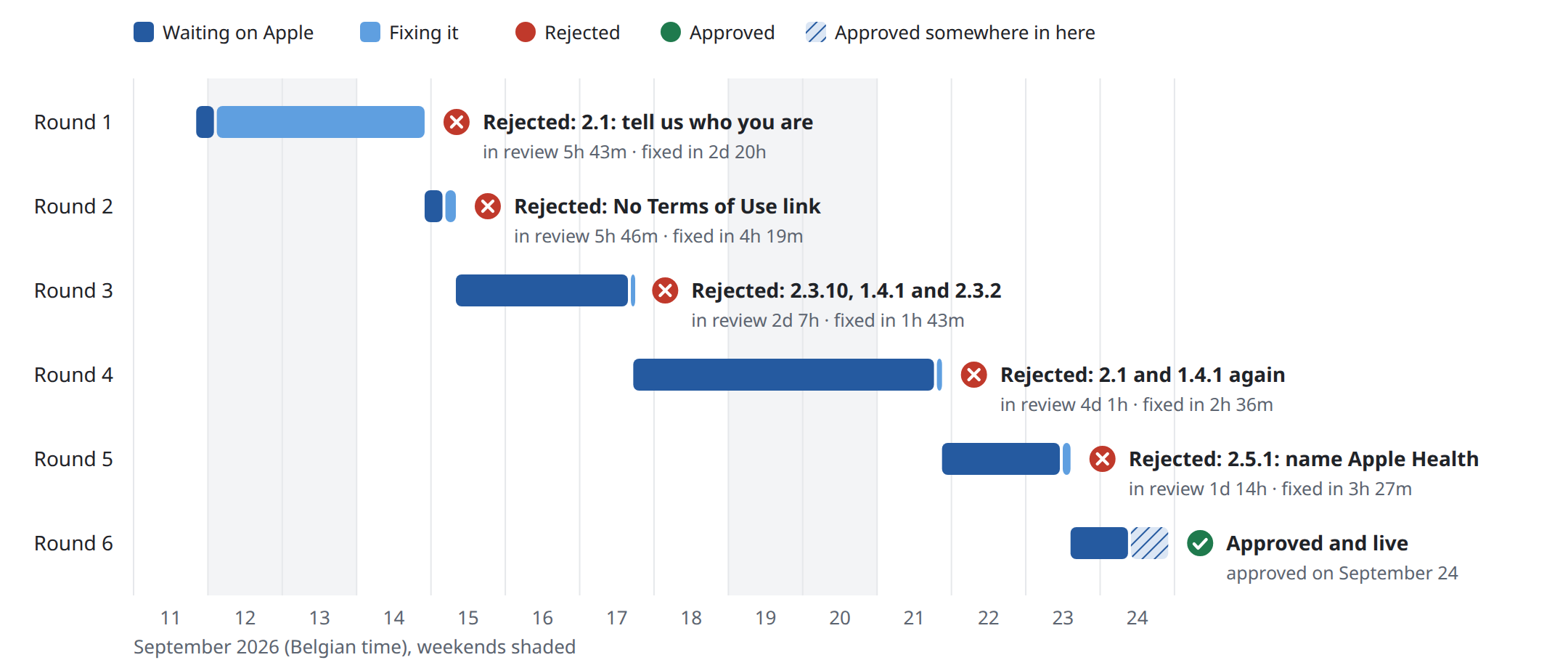
The dark bars are Apple, the light ones are me. A little over nine of those 13 days were spent waiting on App Review. Fixing things took me 12 hours in total for the last four rejections. The first one sat over a weekend.
App Review works around the clock, weekends included. The first rejection landed at 01:56 on a Saturday, the second at 03:43 on a Tuesday. It’s pretty cool to get feedback on your app in the middle of the night, on a weekend. 🦉
The first two rejections came back in under six hours. Those were the questionnaire for new developers, and a check done by a machine. From round 3 on, the reviewer went through the app itself. Rounds 3 to 5 took between a day and a half and four days each. A fix that took me under two hours still cost another two to four days of waiting. So every rejection you can avoid saves days, not hours.
Updates are a lot faster now. Version 1.1.82 was submitted at 13:18 and live at 22:13 the same day.
1. Guideline 2.1: tell us who you are#
The first rejection wasn’t about the app at all. My developer account had “a limited App Review history”. So Apple wanted to know more about me before looking at the app. They asked for seven things: a screen recording on a physical device starting at app launch, the app’s purpose and audience, setup instructions, every external service the app depends on (data providers, payment, AI), any regional differences, credentials for regulated industries, and an overview of what you can buy.
Apple asks you to also put the answers in the Notes field of App Review Information. That way the next reviewer sees them. I keep those notes in the repo, in a listing.json next to the store description. A script pushes them through the App Store Connect API. That way the notes get a git history like everything else. It helped a lot with number 6 below.
2. No link to the Terms of Use#
This one came from an automated check, three days later. Snapkin sells two auto-renewing subscriptions. For those, Apple wants a working link to the Terms of Use (EULA) in the App Store listing itself. The paywall inside the app already had Terms and Privacy links. That didn’t count.
The fix was text only. I added this to the end of the App Store description:
Snapkin: monthly and Snapkin: yearly are auto-renewing subscriptions. The
price in your own currency is shown in the app before you buy. Payment is
charged to your Apple Account at confirmation, and the subscription renews
for the same period unless it is turned off at least 24 hours before the
current one ends. Manage or cancel it in your Apple Account settings.

Terms of Use (EULA): https://getsnapkin.app/en/terms
Privacy Policy: https://getsnapkin.app/en/privacy
If you use Apple’s standard EULA, a link to that one in the description works too.
3. Guideline 2.3.10: Google Play is mentioned in the iOS app#
The iPhone and the Android app share all of their text. So seven pieces of text named both stores, in all ten languages. The paywall said “Cancel any time, from the App Store or Google Play”. Apple doesn’t want an iPhone user to read about another store, anywhere in the app.
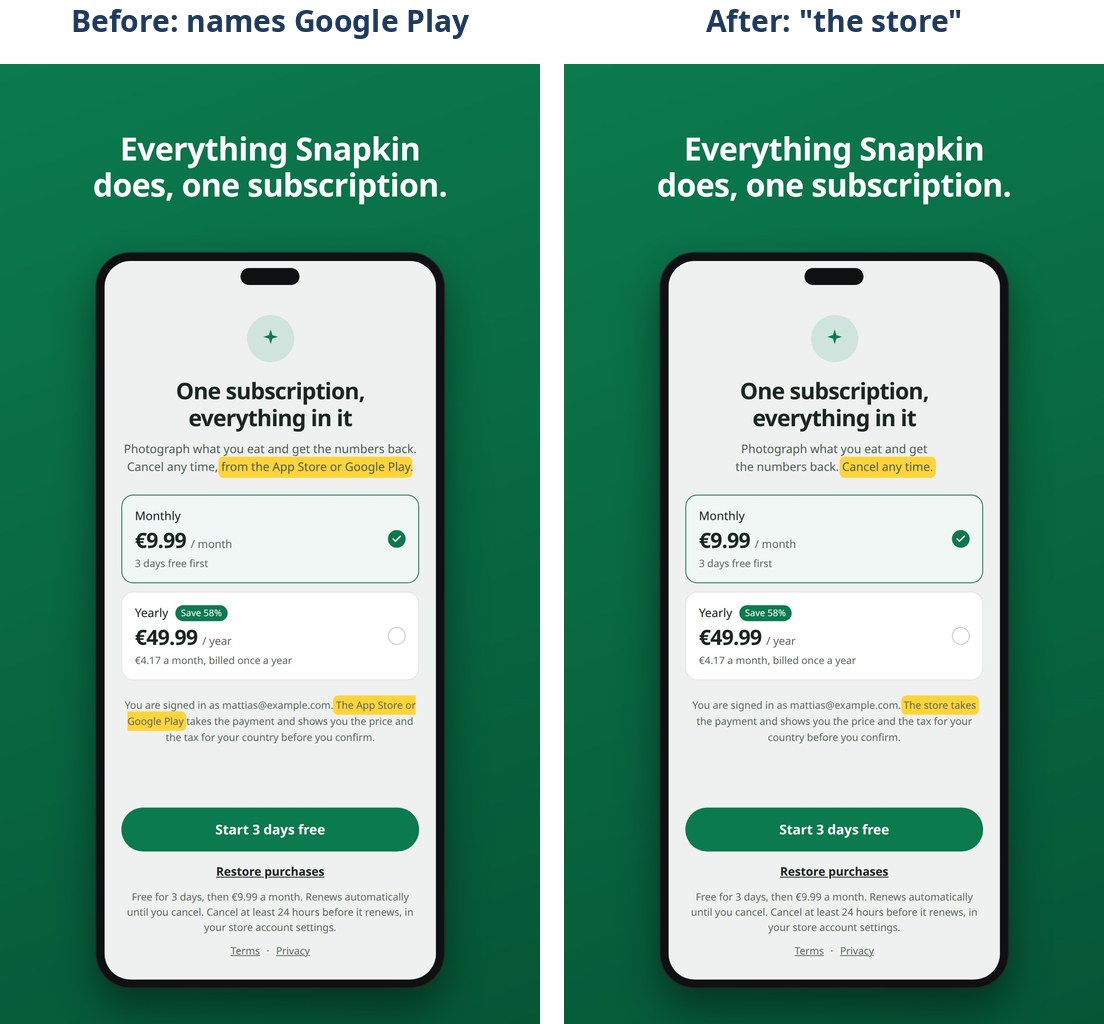
Most of the text simply says “the store” now. But two Google Play links have to stay, so the Android app can open its subscription page. Those are behind a flag that is set when the app is built:
// resources/pwa/lib/shell.js
export function manageSubscriptionUrl(source, productId = null) {
    if (source === 'apple') {
        return 'https://apps.apple.com/account/subscriptions';
    }

    if (source === 'google' && import.meta.env.VITE_PLATFORM !== 'ios') {
        const query = productId && bundleId ? `?sku=${productId}&package=${bundleId}` : '';

        return `https://play.google.com/store/account/subscriptions${query}`;
    }
    // ...
}
The build script sets VITE_PLATFORM=ios or VITE_PLATFORM=android. Vite replaces import.meta.env.VITE_PLATFORM with a literal string at build time. So on iOS the condition becomes 'ios' !== 'ios'. That’s always false. The minifier then drops the whole branch. The URL isn’t hidden in the iOS app, it’s not in there.
You can check that by building both and searching the output:
$ VITE_PLATFORM=ios npm run build:native
$ grep -rhoE "play\.google\.com/store/[a-z/]+|Apple Health|Health Connect" native/www | sort | uniq -c
      1 Apple Health

$ VITE_PLATFORM=android npm run build:native
$ grep -rhoE "play\.google\.com/store/[a-z/]+|Apple Health|Health Connect" native/www | sort | uniq -c
      1 Health Connect
      1 play.google.com/store/account/subscriptions
To make sure it can’t come back, the iOS build now fails when the bundle mentions the other store:
step "no other store in the bundle"
leaked=""
for found in $(grep -rlniE "google play|play store|play\.google\.com|health connect" native/www 2>/dev/null); do
    grep -qF "CdvPurchaseCapacitor" "$found" && continue
    leaked="$leaked $found"
done

if [ -n "$leaked" ]; then
    echo "   FOUND Google Play or Health Connect references in the iOS bundle:$leaked"
    fails=$((fails + 1))
fi
The one exception is the purchase plugin’s own code. It has a Platform.GOOGLE_PLAY constant inside it. Removing that means forking the plugin. Apple has been fine with it so far. There’s also a check on the app’s source code (npm run other-store). It fails on any mention of Google Play. That way I hear about it before a build ever runs.
4. Guideline 1.4.1: medical information without citations (twice)#
Snapkin gives you a calorie target and a protein target. It also explains why it does certain things. Apple counts that as health information. Health information needs sources you can easily find in the app.
The first fix didn’t pass. I had a detailed research section on the website already. So I added links to it next to the numbers, and a “Where these numbers come from” row in Settings. Apple rejected the next build for the exact same reason. A link that opens Safari isn’t a citation in the app. It’s a link the reviewer can choose not to follow.
So the second fix shows the sources inside the app itself. I didn’t want to keep a second list of every source up to date by hand. Instead, the server renders each research page and pulls the external links out of it:
// app/Support/ResearchSources.php
public static function for(ResearchTopic $topic): Collection
{
    return self::links(self::render($topic))
        ->filter(fn (array $link): bool => self::isCitation($link['url']))
        ->unique('url')
        ->values();
}
An API endpoint sends that list to a new screen in the app. Every decision the app makes gets a short summary, then each study behind it as a link.
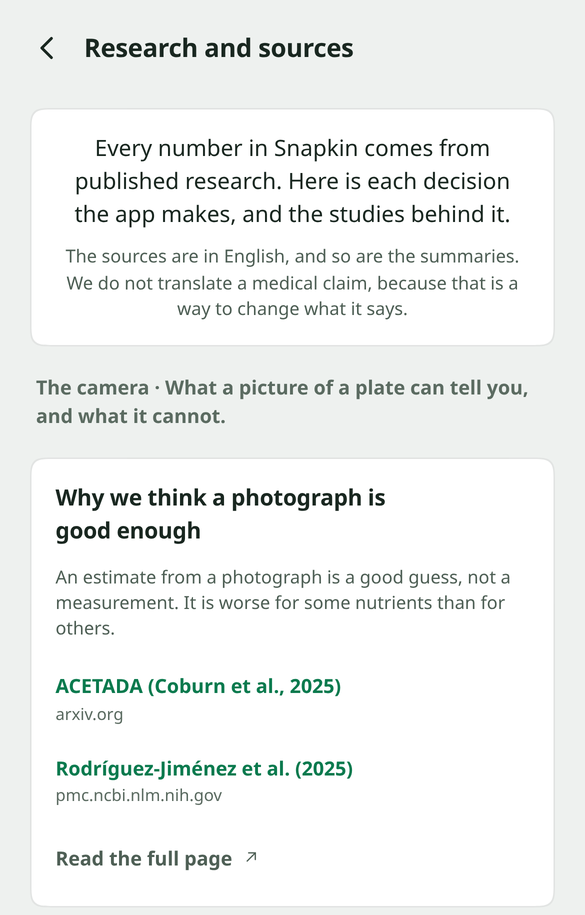
That version passed. ✅ The review notes also tell the reviewer exactly where to tap: “menu (top right) > Settings > Our research”.
5. Guideline 2.3.2: the promotional image for the subscriptions#
You can upload a 1024x1024 image to promote an in-app purchase on the App Store. I made one image and used it for both the monthly and the yearly subscription. My reasoning was that it’s the same product, just billed differently.
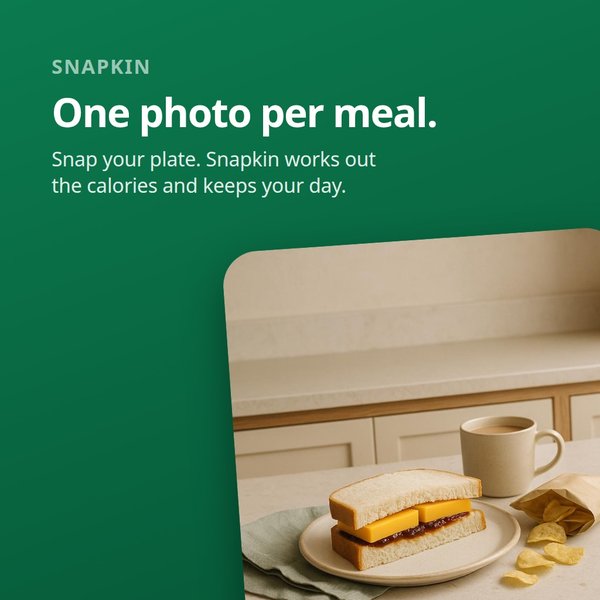
Apple listed three problems with it: the same image on two different products, an image that’s a screenshot from the app, and text that’s too small to read.
The promotional image turned out to be optional. So I deleted it. No code changed for this one.
6. Guideline 2.1: we need an account with an expired subscription#
My demo account for the reviewer was too nice. 😇 I had given it a free subscription and filled it with a day of meals. That way the reviewer would land straight in a working app. The notes even said so: “It is comped, so the paywall is not in the way”.
Apple wanted the paywall in the way. They need to test the whole purchase flow. For that they want an account whose subscription has expired. Not “never subscribed”, expired. So I wrote a command that does exactly that to a demo account:
$ php artisan cal:billing:lapse [email protected] --apply
It removes the free access and ends any subscription the account has. If the account never had one, it creates an ended sandbox subscription:
private function mint(User $user, CarbonImmutable $ended): void
{
    Subscription::query()->create([
        'user_id' => $user->id,
        'source' => BillingSource::Apple,
        'external_id' => 'demo-lapsed-'.$user->id,
        'product_id' => Plan::find('monthly')?->productId(BillingSource::Apple),
        'environment' => 'sandbox',
        'status' => SubscriptionStatus::Ended,
        'expires_at' => $ended,
        'renews' => false,
        'trial' => false,
    ]);
}
It refuses to touch an account with a real, paid subscription. I have to run it again before every submission. The reviewer buys a sandbox subscription while testing. That unlocks the account again.
7. Guideline 2.5.1: HealthKit isn’t clearly named in the app#
Snapkin can read your weight, steps and active calories from Apple Health. In the app, the buttons said “Read from Health” or just “Connect”. Apple wants the app to say clearly that it uses HealthKit. “Health” wasn’t clear enough.
Worse, my App Store screenshots showed “Health Connect” in Settings. That’s the Android name. The screenshots are rendered by a headless Chrome. That isn’t an iPhone, so the app decided it was running on Android.
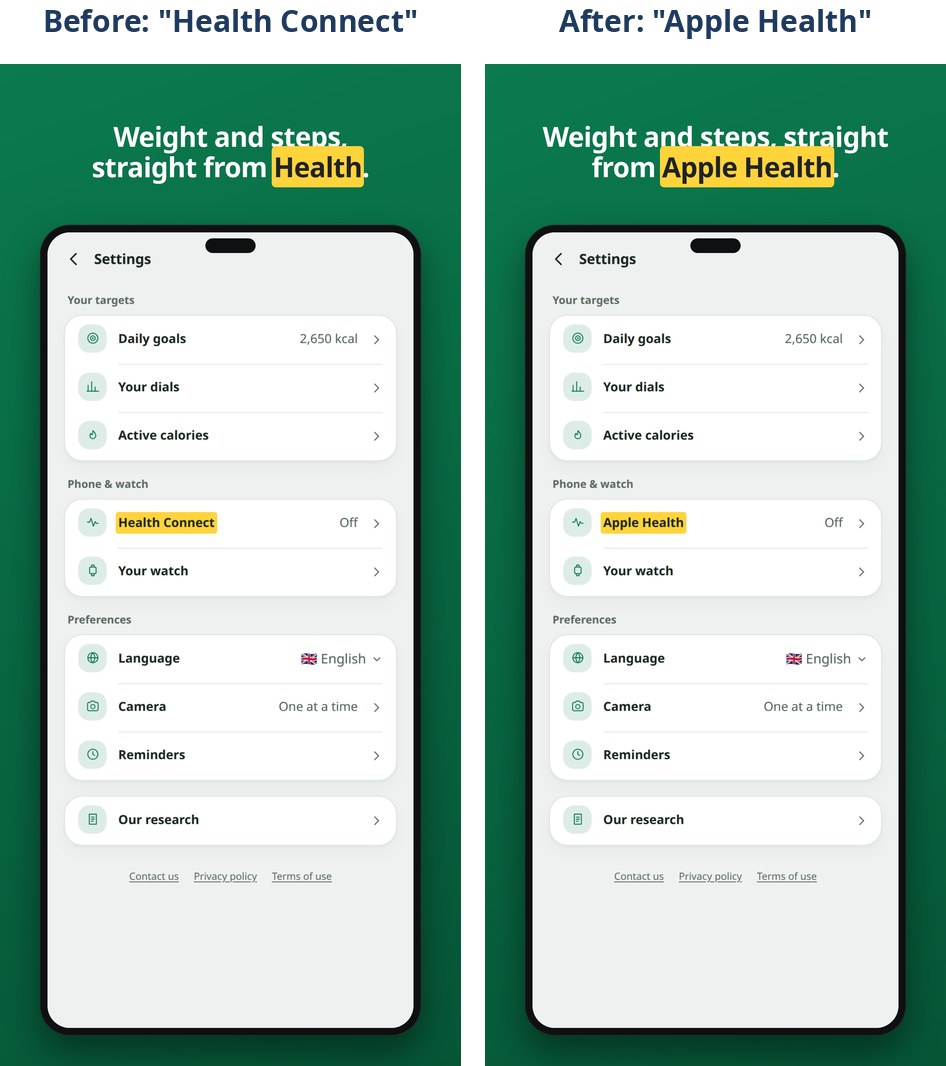
Every place that mentions the health app now uses one name. It is picked with the same build-time flag as the Google Play fix:
// resources/pwa/lib/health.js
function storeName() {
    if (import.meta.env.VITE_PLATFORM === 'ios') return 'Apple Health';
    if (import.meta.env.VITE_PLATFORM === 'android') return 'Health Connect';

    // A preview's pretend store is an iPhone's. After the two lines above, or
    // the Android bundle would carry the other store's name again.
    if (devProfile()) return 'Apple Health';

    return isIOS ? 'Apple Health' : 'Health Connect';
}

export const healthStoreName = storeName();
And the text gets the name passed in, instead of saying “Health”:
- 'onboarding.health.allow': 'Read from Health',
+ 'onboarding.health.allow': "Read from {store}",
- 'stats.health_connect': 'Read it from Health',
+ 'stats.health_connect': "Read it from {store}",
The screenshot script now builds with VITE_PLATFORM=ios too. So the App Store pictures show what an iPhone shows. And the bundle check from rejection 3 also fails on “Health Connect” in the iOS build.
Things I fixed before Apple could flag them#
After the fifth rejection I had my coding agents go through the whole App Review Guidelines and check the app against every rule. I fixed most of what they found before resubmitting. A few of those:
- The notification pre-prompt button says “Continue”, not “Allow”. Apple rejects a screen shown before the real permission prompt if its button says “Allow”, or if it lets you skip the real prompt (5.1.1(iv)).
- The paywall says what happens after the trial. “Free for 3 days, then €9.99 a month. Renews automatically until you cancel.” You can see it under the button in the paywall screenshots above.
- The age rating declares health topics. Apple’s own definition includes “calorie tracking”. That makes the app 9+.
- Contact, Privacy and Terms are in Settings, not only on the paywall.
- Sandbox purchases work on the live server. The reviewer tests on your live server with a sandbox Apple account. My server refused sandbox receipts at first. So tapping Subscribe did nothing.
I can’t prove these were needed. But each took minutes, and every rejection cost me days.
If you’ve had an App Store rejection that isn’t on this list, I’d love to hear about it. 🙏