You can already point an AI agent at your Filament admin panel and have it click around like a human. Take a screenshot, find the button, fill the form, submit, screenshot again to check it worked. With computer-use or a browser MCP, that works today. It’s also slow, brittle, and spends a small fortune in tokens describing pixels to figure out where the “Save” button is.
So I built filament-mcp
: an MCP server that exposes your existing Filament resources directly, no browser in the loop. The agent calls create_post with a title and body instead of hunting for the form field. Same panel, same rules, just a far more efficient way in.
The pitch is simple: add the package, set two things in a config file, and your existing resources are AI-operable out of the box. Everything past that point (scoping abilities, custom actions, page logic) is optional.
Why a second way in#
I built this to solve a real problem of my own. I’m not interested in an AI that writes posts for me. I wanted one that handles the mundane upkeep around content: fix a broken link, correct a typo, add a link from an older post to a new page once it goes live. The kind of maintenance that piles up across hundreds of entries and never quite reaches the top of my list. There are two ways to hand an agent that kind of access: build an API for it, or take the Filament dashboard I already have and expose it in an AI-native way. The dashboard already holds every form, validation rule, and policy I’d otherwise rebuild from nothing in an API, so the second option won easily.
The same door opens a second, lower-risk use: read-only access to gated production data, so an agent can help me troubleshoot and answer support questions without being able to change a thing.
The goal stayed the same the whole way through: what I can do as a human in Filament, my AI can now do too, with the ability to dial its capabilities down while trust is still being built. You don’t have to hand over the whole panel on day one. Start an agent read-only, scope a resource to list-and-read, and add writes once it’s earned them.
The whole point is to let an agent operate the panel that’s already running, and the browser is a clumsy way to do that. It’s fine as a fallback for anything with no API, but for a Filament panel it leaves a lot on the table. You already described your data once, in your resource forms. The form is the schema: which fields exist, which are required, which are a select with three options. filament-mcp reads that and turns it into tool definitions, so the agent gets a typed contract instead of a screenshot to interpret. Add a field to your form and it shows up as a tool argument automatically. Nothing to wire up.
I’m not the first to bridge Filament and MCP. Kirschbaum’s Laravel Loop
does it with a few generic tools (one get_filament_resource_data, one execute_filament_resource_action) you point at any resource, and Laravel ships its own MCP package
for building servers by hand. filament-mcp takes the other approach: it generates a named, typed tool per resource and operation straight from your form, so the agent calls create_post(title, body) instead of a generic write-this-record tool, and writes run through create and update rather than only bulk actions. For content work, that typed per-resource surface is exactly what I wanted.
Installing it#
Two commands. This needs PHP 8.2+, Laravel 12 or 13, and Filament 5.
composer require mattiasgeniar/filament-mcp
php artisan migrate
The migration adds two tables: one for hashed access tokens, one to audit every tool call. The config file (config/filament-mcp.php) is published for you on install.
Now the two things you have to decide.
Who’s allowed in#
Access is forbidden until you say otherwise. There’s no “on by default” footgun here: until you grant access, nobody can connect, even with a valid token. The recommended way is a gate, because it’s cache-safe:
// app/Providers/AppServiceProvider.php
use Illuminate\Support\Facades\Gate;

Gate::define('useFilamentMcp', fn ($user) => $user->is_admin);
If the rule doesn’t belong in a gate, there’s a callback instead:
use Mattiasgeniar\FilamentMcp\FilamentMcp;

FilamentMcp::authorizeUsing(fn ($user) => $user->is_admin);
Which resources to expose#
List the resources you want reachable as bare class strings. Each one gets list, get, create, and update tools wherever the matching Filament pages exist. For a clean Filament panel, that’s 90% of the job:
// config/filament-mcp.php
'resources' => [
    \App\Filament\Resources\Products\ProductResource::class,
    \App\Filament\Resources\Orders\OrderResource::class,
    \App\Filament\Resources\Customers\CustomerResource::class,
],
Issue a token (more on that below), point a client at it, and the agent can already operate those resources.
delete_* tools are never generated by this shorthand. Deleting records is destructive enough that I made it an explicit opt-in, and even then the model’s policy still runs per record. The default is the safe one.
When a resource needs something the shorthand doesn’t give you, map it to an array instead and scope each ability yourself. It’s all opt-in, and you can mix bare strings and arrays in the same list:
'resources' => [
    // Still shorthand
    \App\Filament\Resources\Products\ProductResource::class,

    // Read-only: an agent can list and fetch announcements but not touch them
    \App\Filament\Resources\Announcements\AnnouncementResource::class => [
        'create' => false,
        'update' => false,
    ],

    // Opt into deletes for this one resource
    \App\Filament\Resources\Drafts\DraftResource::class => [
        'delete' => true,
    ],

    // Force list_* on, even though this resource has no index page
    \App\Filament\Resources\AuditLogs\AuditLogResource::class => [
        'list' => true,
    ],
],
By default an operation only exists if the matching Filament page does, but an explicit boolean wins either way. 'update' => false takes an ability away that the pages would have given you. 'list' => true adds one the pages don’t imply, like listing a resource that only has a view page. Your policies, query scoping, and attribute visibility don’t change. You’re only deciding which tools get generated.
What the agent gets#
Each exposed resource can produce list_*, get_*, create_*, update_*, and delete_* tools, named from the model: create_post, update_product, and so on. By default they’re only generated when the corresponding Filament page exists, so no edit page means no update tool, unless you force it on in the config as above. A view-only resource (just a view page, no index) becomes fetchable by id without exposing a full listing, which is exactly what you want for something an agent should read one record of but not enumerate.
There’s also a single describe_resources tool. The agent calls it once to discover everything that’s exposed: the resources, their operations, custom actions, and fields. So you don’t have to hand-document any of this for the model. It asks, and your config answers.
Reads and writes lean on different parts of your resource, deliberately. Writes are driven by the form, so the agent can only set fields the form allows. Reads return the union of the infolist (what Filament shows on the view page) and the writable form fields, so an agent can always read back what it just wrote and still see view-only columns. And the model’s $hidden / $visible settings are enforced before any schema is built, so a hidden attribute never leaks into discovery, reads, writes, search, or sorting, even if it’s sitting in the form.
Customisability, all of it optional#
The defaults are meant to be enough to ship. But real panels have logic that doesn’t live in a form field, and that’s where this opens up. None of the following is required. Reach for it only when you hit the need.
Page logic via a prepare class. Some of your save logic lives on the Filament page, not the form: slug generation, a derived field, a default. Mirror it with a small class implementing PreparesRecordData:
use Illuminate\Database\Eloquent\Model;
use Illuminate\Support\Str;
use Mattiasgeniar\FilamentMcp\Contracts\PreparesRecordData;

class PreparePostData implements PreparesRecordData
{
    public function __invoke(array $data, ?Model $record): array
    {
        $data['slug'] ??= Str::slug($data['title']);

        return $data;
    }
}
Point the resource at it with 'prepare' => PreparePostData::class and it runs on every create and update.
Custom actions as their own tools. This is the guardrailed way to expose a Filament action or bulk action. Map a name to a class extending ResourceAction:
\App\Filament\Resources\Posts\PostResource::class => [
    'actions' => [
        'publish' => \App\Mcp\PublishPost::class, // becomes the publish_post tool
    ],
],
use Illuminate\Database\Eloquent\Model;
use Mattiasgeniar\FilamentMcp\Actions\ResourceAction;

class PublishPost extends ResourceAction
{
    public function description(): string
    {
        return 'Publish the post.';
    }

    public function handle(Model $record, array $arguments): mixed
    {
        $record->update(['published' => true]);

        return ['published' => true];
    }
}
You don’t have to wire up the guardrails. The action is authorized before it runs (the acting user must pass the resource policy ability, update by default, against that record), and arguments are an allowlist: only the keys you declare in rules() reach handle(), so an agent can’t smuggle in attributes you didn’t ask for.
Explicit read fields. If a resource builds its view schema on the page (a ViewRecord) rather than the resource, introspection finds nothing to read. List the readable attributes yourself:
\App\Filament\Resources\RunResource::class => [
    'write' => false,
    'read_fields' => ['check_id', 'result', 'started_at', 'ended_at'],
],
It’s the same panel, with the same locks#
The thing I cared about most: an agent going through MCP should hit exactly the walls a human hits in the browser, no more access, no less. So the request runs through every layer your dashboard already has.
- Token. Every request needs a valid, non-revoked bearer token.
- Authorization. The resolved user has to pass your gate or callback. Denied until you grant it.
- Resource surface. Tools exist only for operations whose Filament pages exist. Delete is opt-in.
- Attribute visibility. Eloquent
$hiddenfields never make it into a schema or a response. - Policies. Each call still respects the model’s Filament policy.
- Query scoping. Records are read and written through the resource’s
getEloquentQuery(), so your tenant scopes and soft-delete filters apply. - Audit. Every call is logged to
filament_mcp_tool_calls, pruned after a year by default (audit.retention_days, set it to0to keep the log forever).
If you run a tenant panel, the same tenancy rules hold: the token user has to pass canAccessTenant() for the tenant named in the request header before any tool runs.
Tokens, from the CLI or the panel#
Tokens are bound to the issuing Filament user, hashed before storage, and shown exactly once. The CLI route:
php artisan filament-mcp:token [email protected] --name="My laptop"
It refuses to issue a token to a user your authorization rule rejects, so you can’t accidentally hand out access wider than the gate allows (--force if you really mean to).
If you’d rather not be the token-vending machine for your team, register the plugin and each user manages their own:
use Mattiasgeniar\FilamentMcp\Filament\FilamentMcpPlugin;

$panel->plugin(FilamentMcpPlugin::make());
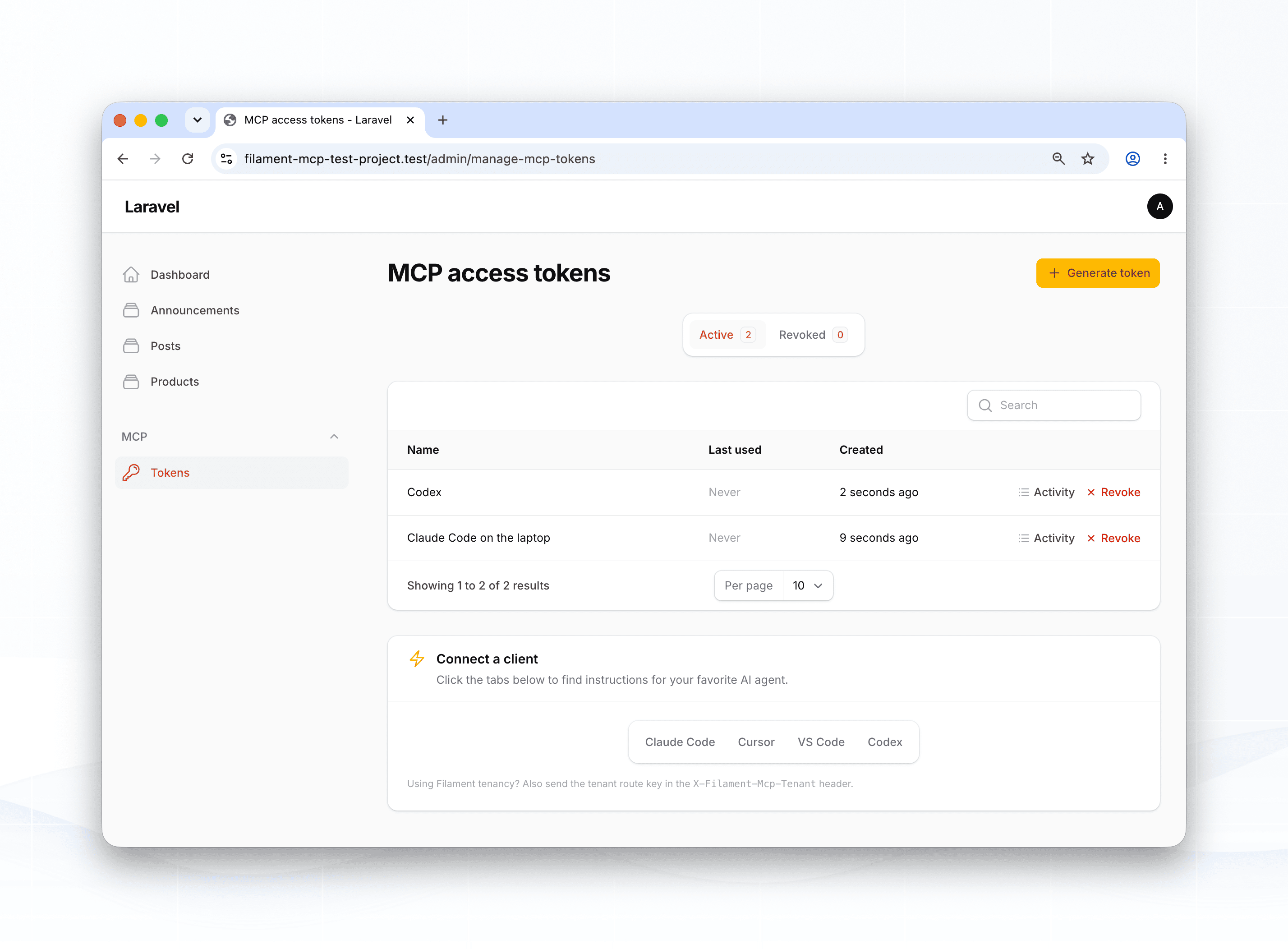
That adds an MCP → Tokens page, visible only to users your authorization rule allows (the same gate that guards the server). They generate and revoke their own tokens, with the plaintext shown once and a copy button.
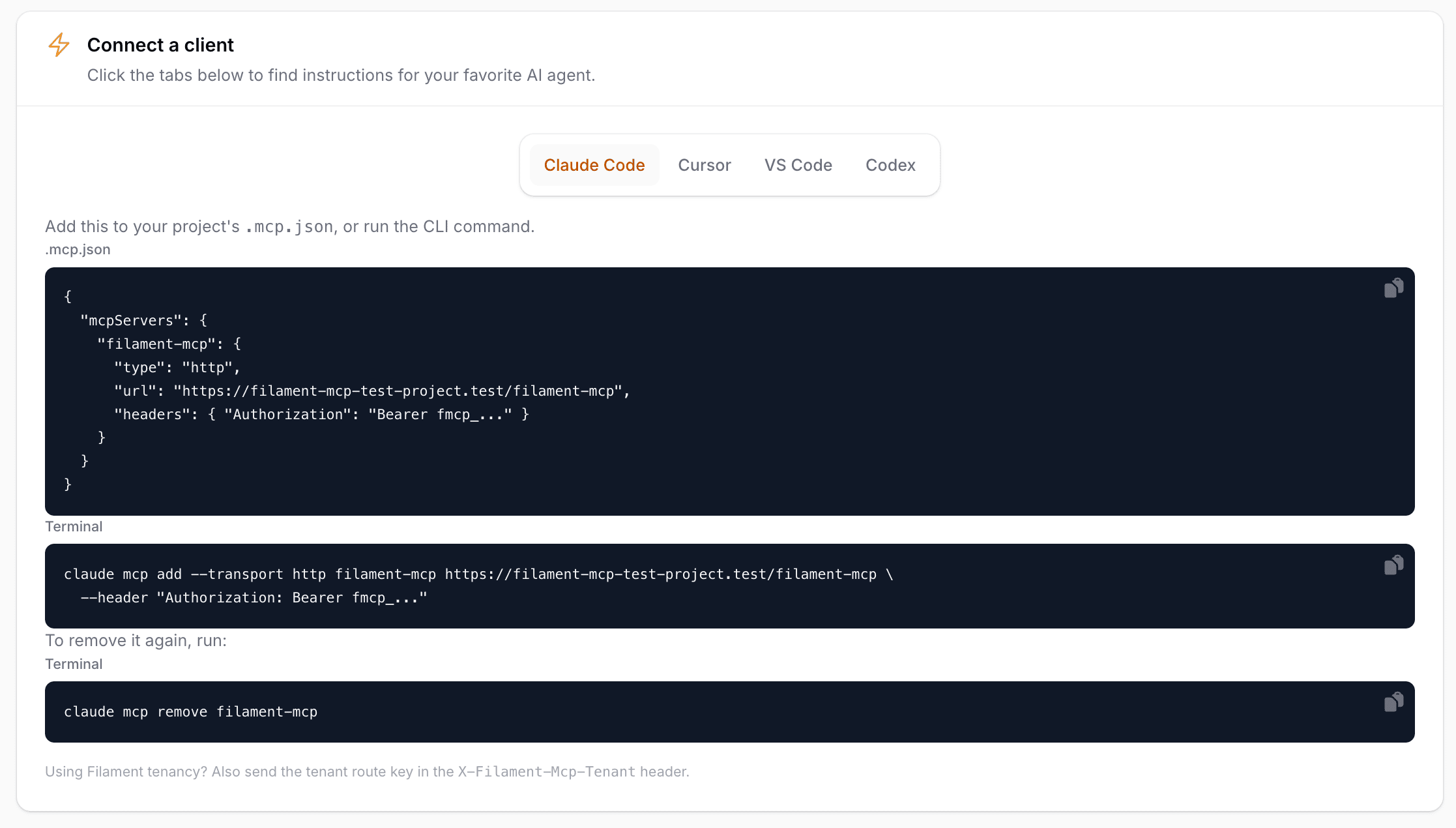
The same page renders a ready-to-paste client config under a Connect a client section, with your endpoint URL already filled in, for Claude Code, Cursor, VS Code, and Codex. So a teammate goes from “I’d like access” to a working .mcp.json without you in the loop.
Each token also has an Activity action, which opens a paginated log of every call that token made, newest first: the tool, the status, how long it took, and when. The arguments for any call are a click away in a modal. It’s scoped to your own tokens, so you can see exactly what a given key has been up to without going near the database. And because calls are now attributed to the token rather than just the user, two keys belonging to the same person stay distinct.
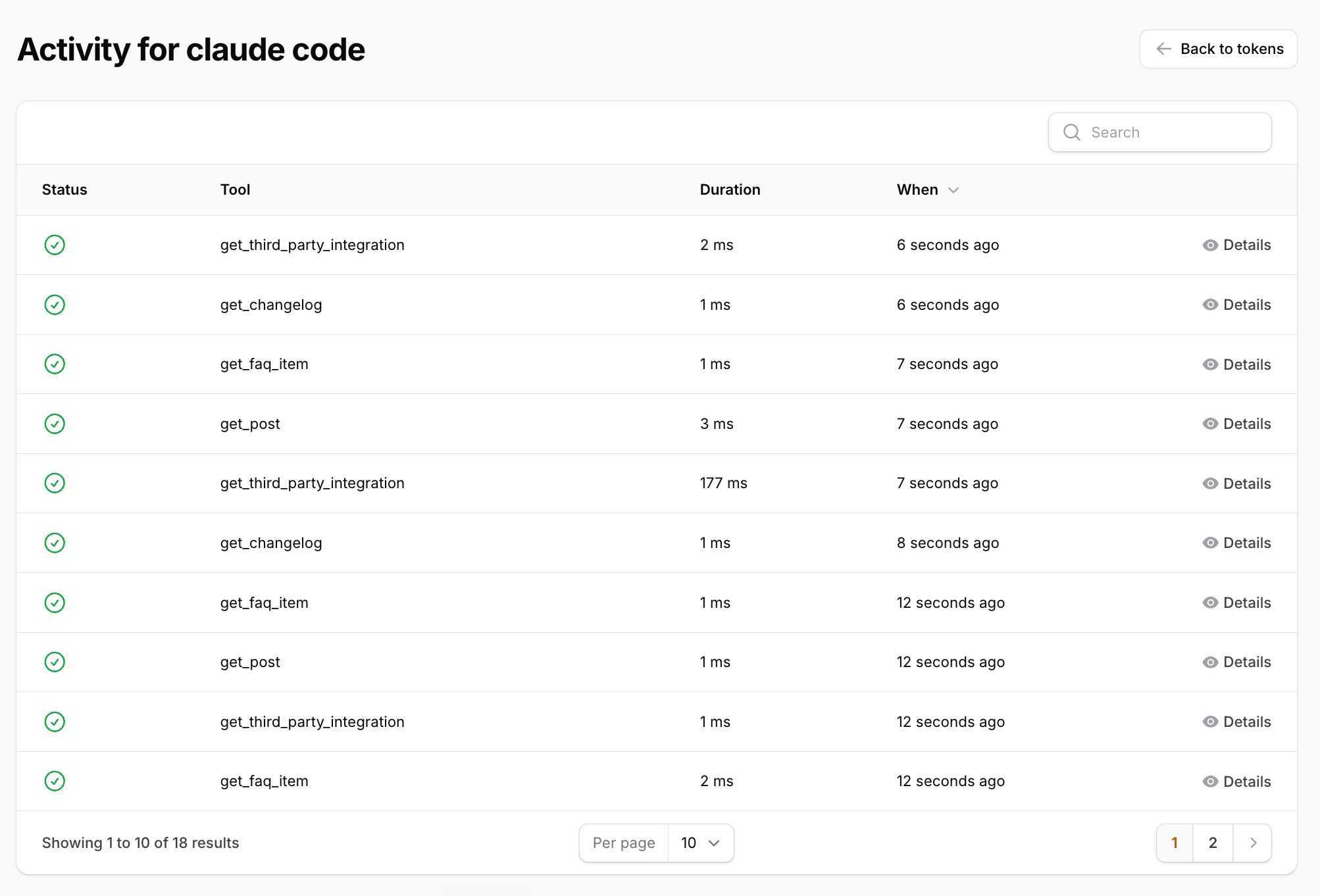
It’s also the clearest window I’ve found into how an agent actually uses MCP over the wire. You see the calls it really made for a single prompt, in order, with timings: which tools it reached for, how it structured each one (the arguments are one click away), and where it repeated itself. The screenshot above is one agent answering one question, and you can watch it work through get_post, get_changelog, and get_faq_item to gather what it needed. If you’ve ever wanted to see what your LLM is doing under the hood, this is it, no proxy or packet capture required.
Connecting a client#
The server speaks the streamable HTTP transport. Point a client at the URL and pass the token as a bearer header. For Claude Code, in .mcp.json:
{
  "mcpServers": {
    "my-app": {
      "type": "http",
      "url": "https://your-app.test/filament-mcp",
      "headers": { "Authorization": "Bearer fmcp_..." }
    }
  }
}
Or let the CLI write it for you:
claude mcp add --transport http my-app https://your-app.test/filament-mcp \
  --header "Authorization: Bearer fmcp_..."
What it won’t do (yet)#
This is a v1 and I scoped it on purpose. Keep these in mind before you wire it into anything load-bearing:
- Text-like fields only for writes. Text, textarea, rich/markdown editors, selects, toggles, numeric inputs, and date pickers are mapped. File uploads, custom components, and fields the form wouldn’t persist anyway (
disabled(),dehydrated(false)) are skipped, so the writable surface matches what a real save would write. - Closure-based form validation isn’t enforced at the MCP layer. Your database constraints and model events are still the backstop.
- Page-level logic is only honored through a
prepareclass, as above.
The reads side is more forgiving, since it unions the infolist and the form, so a resource with only a form, only an infolist, or both is fully readable either way.
This is the fastest path I know of to make an existing Filament panel something an AI agent can drive properly, instead of squinting at screenshots. The code is on GitHub , issues and PRs welcome.