Every meal you add to Snapkin goes through a lot of work on the server: resizing the photos, looking for barcodes and QR codes, preparing everything for the AI call, … Most of that is hard to make faster. So I moved the one part I could move: when the photos leave the phone.
Until the latest update, the photos were sent in one request, after you tapped Analyse. Now every photo starts uploading the moment you take it, while you’re still typing a note or lining up the second shot.
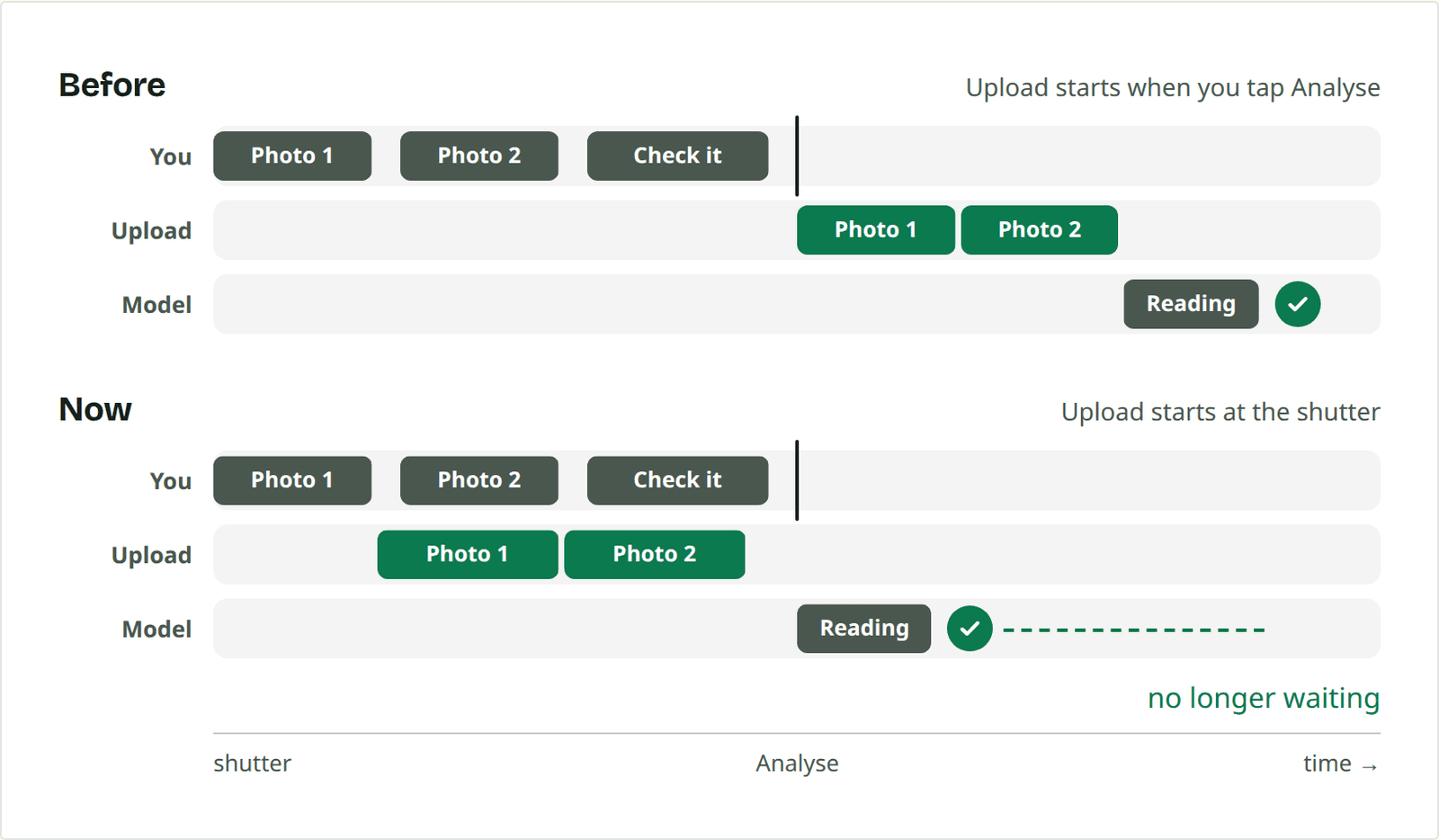
When you tap Analyse, the photos are already on the server. The meal itself is a few hundred bytes of JSON that points at them. Right now that saves 1 to 2 seconds per meal. The AI call is still the slowest part, but it no longer waits for an upload to finish.
Sending photos early has a few side effects. The server now holds photos that may never end up in a meal, a retry has to cope with a photo that never arrived (or arrived in half), and a photo you retake has already used some of your data.
Read more information on the Snapkin Engineering blog