This post was originally published on the Oh Dear blog on 31 October 2018. I moved it to my own blog in October 2026 and added notes for Laravel 13 and Horizon 5.
Laravel offers a convenient way to create asynchronous background tasks using its queues . We utilize those heavily at Oh Dear! for all our monitoring jobs and in this post we’ll share some of our lessons learned and what we consider to be best practices.
Getting started with queues#
The most basic example you’ll find is similar to this, where you push a job onto a queue and a worker will pick it up for processing.
Job::dispatch()->onQueue('general');
Whatever job you wanted to queue has now been pushed to a queue named general. Every other job you add to that queue will be added (FIFO
) and processed in that order.
While a great way to start, you quickly run into a queue that potentially looks like this.
\_ job #1: 12s
\_ job #2: 3s
\_ job #3: 3min
\_ job #4: 32min
\_ job #5: 5s
Assuming you have one worker to pick jobs from this queue, job 5 would have to wait 2115 seconds for all former jobs to be completed before it gets its turn.
Adding multiple workers to that queue speeds things up, but still has the potential for blocking, long running tasks. Ideally, you’d want to split that up further.
Fast vs. Slow jobs#
One strategy we first used was to make a generic seperation between fast and slow jobs.
If you remember the purpose of Oh Dear! (monitoring sites, crawling them, reporting page errors etc.), it quickly becomes apparent that we are heavily dependent on 3rd parties.
If the site we’re monitoring is quick to crawl, it might take only a few minutes. If it’s a slow site (on which we have to apply rate limiting), it might take a very long time but consume few resources along the way.
Slow to us means the remote side is slow. It also means we’re wasting CPU cycles just waiting for the other end to respond. We could easily spin up more workers and do more in parallel, since the load is negligable on our end.
At first, we ended with a queueing system similar to this.
- fast worker
 \_ worker #1
 \_ worker #2

- slow worker
 \_ worker #1
 \_ worker #2
 \_ worker #3
 \_ worker #4
The result was that the fast queue consumed most of the CPU & memory on our end: it quickly burned through its queue, performing all the “fast” tasks (checking uptime, certificate checks etc.).
The slow queue was running more consumers (aka workers), because we were constrained by the remote end, not ours. This meant we could easily run more of those.
While this worked for the first few weeks in beta, as our customer base grew, this also posed a few problems: while the fast queue was generally pretty fast, we were pushing a lot of different workloads on there.
UptimeChecker::dispatch()->onQueue('fast');
CertificateChecker::dispatch()->onQueue('fast');
...
A certificate check takes a bit longer to complete than most uptime checks . And, arguably, the uptime check is more important than the certificate check.
We needed a better solution.
Single-purpose queues#
It didn’t take long for us to create specific queues for each job “type” we were launching. We’re now in a setup where each check performed lives on its own queue. This allows us a great deal of flexibility in terms of sizing and scaling them.
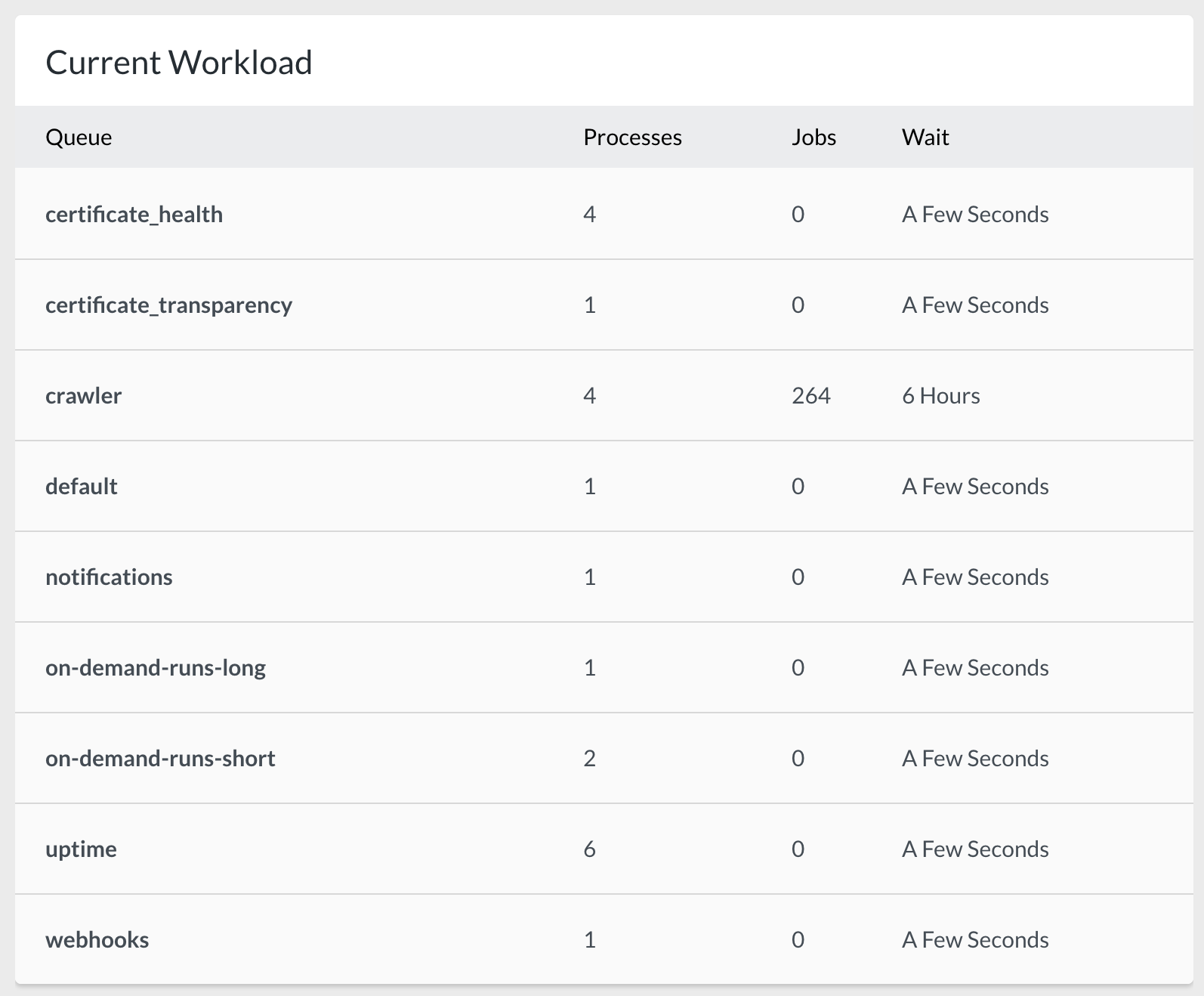
We run a few very specific job queues too. Our main application runs on the following queues.
- certificate_health
- certificate_transparency
- crawler
- uptime
These queues run our monitoring checks for all our sites. On top of those, we have assisting queues.
- default
- notifications
- webhooks
The notifications and webhooks are pretty self-explanatory: they run all our notifications (Slack/Discord/Nexmo/…) and perform the webhook calls to 3rd party endpoints.
The default queue is used for small, one-off jobs that are just too small for their own queue (like sending mails like our monthly uptime reporting
).
Update, October 2026: the idea held, the list didn’t. certificate_transparency is gone, and uptime is now split into one queue per checker location. The main production environment alone defines 22 Horizon supervisors today. The Horizon section further down
has the details. If you’re on Laravel 13, Queue::route()
can also set the queue per job class from one service provider, instead of repeating onQueue() at every dispatch.
But then there are some special queues, too.
On-demand queues for a better UX#
When you add a site to be monitored, your initial experience looks like this.

That’s the user experience we want: immediate feedback and the feeling of responsiveness when you add a site. The certificate & uptime checks happen near-instantly, the broken links checking takes a bit longer as the site needs to be crawled.
To make that work, we push the sites that have just been added to an empty queue with a custom set of workers that can immediately pick them up.
UptimeChecker::dispatch()->onQueue('on-demand-runs-short');
CertificateChecker::dispatch()->onQueue('on-demand-runs-short');
CrawlerChecker::dispatch()->onQueue('on-demand-runs-long')
We didn’t take this approach at first, which meant our queues ended up like this.
- uptime worker
 \_ job #1
 \_ job #2
 \_ job #3 <-- the uptime check for the site that was just added

- certificate worker
 \_ job #1
 \_ job #2
 \_ job #3
 \_ job #4
 \_ job #5 <-- the certificate check for the site that was just added
If you added a new site, your were added to the back of the queue and had to wait for all other jobs to complete first. The initial user experience gave the impression we were slow & unresponsive, because it took too long for feedback in the UI.
We first tried to get away with adding them to the front of the queue instead of at the back, but that didn’t entirely work either: if, for some reason, the uptime check took a few seconds to finish its current job, we still had to wait for our new priority job to be picked up.
And since we monitor & crawl sites we don’t control, we have no idea how long each check might take. We need to assume the worst case & plan for that.
The on-demand runs pick up those sites that have just been added and those jobs that the user requested to be run on-demand (which you can trigger either from your Oh Dear! dashboard or through the API ). If we ever reach the point where we detect saturation (ie: the queue never empties), we will have to split the queue again to separate the initial runs vs. the on-demand runs.
Update, October 2026: the on-demand lane stuck around and grew. There are four of them now, each with its own Horizon supervisor: on-demand-runs-short (8 workers), on-demand-runs-long (20 workers, on the crawler server), on-demand-sitemap and on-demand-ai.
If a worker stalls or a queue backs up you want to hear about it before users do. Oh Dear’s application health monitoring watches exactly that.
Update, October 2026: Horizon settings that size your queues#
The reasoning above still holds 8 years later: a queue per type of job, workers sized to the workload, and a separate lane for anything a user is staring at. What changed is how much of that lives in Laravel Horizon ’s config, and how big Oh Dear’s setup got.
Every option below is checked against the Laravel 13 queue docs
, the Horizon docs and Horizon’s published config file
. The Oh Dear examples come straight from its config/horizon.php as it runs today, trimmed. I renamed one environment, the rest is as-is.
What Oh Dear runs today#
The main production environment defines 22 supervisors with 140 worker processes between them. The crawler got its own server and its own Horizon environment: 4 supervisors, 185 processes. On top of that, Oh Dear’s HorizonServiceProvider adds supervisors in code: one uptime supervisor per checker location, and one per Lighthouse and port-scan server.
'environments' => [
    'production' => [
        'general' => [
            'connection' => 'redis',
            'queue' => ['default', 'webhooks'],
            'balance' => 'simple',
            'processes' => 4,
            'tries' => 3,
            'timeout' => 600,
        ],
        'notifications' => [
            'connection' => 'redis',
            'queue' => ['notifications'],
            'balance' => 'simple',
            'processes' => 10,
            'tries' => 3,
            'timeout' => 60,
        ],
        'certificate_health' => [
            'connection' => 'redis',
            'queue' => ['certificate_health'],
            'balance' => 'simple',
            'processes' => 6,
            'tries' => 1,
            'timeout' => 20,
        ],
        'on-demand-runs-short' => [
            'connection' => 'redis',
            'queue' => 'on-demand-runs-short',
            'balance' => 'simple',
            'processes' => 8,
            'tries' => 1,
            'timeout' => 60,
        ],
        // ... 18 more supervisors
    ],

    // The crawler server's own Horizon environment (renamed here)
    'crawler' => [
        'high-load' => [
            'connection' => 'redis-long-running',
            'queue' => 'crawler',
            'balance' => 'simple',
            'processes' => 130,
            'tries' => 1,
            'timeout' => 1700,
        ],
        // ... on-demand-runs-long, sitemap, on-demand-sitemap
    ],
],
Here’s how the queues from the 2018 screenshot compare:
| Queue | Workers in 2018 | Workers in 2026 |
|---|---|---|
crawler | 4 | 130, on its own server |
on-demand-runs-long | 1 | 20, on the crawler server |
notifications | 1 | 10 |
on-demand-runs-short | 2 | 8 |
certificate_health | 4 | 6 |
default + webhooks | 1 + 1 | 4, shared |
uptime | 6 | split per checker location |
Look at the crawler row in that 2018 screenshot: 264 jobs pending and a 6-hour wait. Today that queue has a server of its own.
Pick a balance strategy: auto, simple or false#
Each Horizon supervisor watches one or more queues and picks one of three balancing strategies :
autois the default in the published config. It moves workers between the supervisor’s queues based on load.autoScalingStrategydecides how:time(the default) looks at the estimated time to clear each queue,sizeat the number of jobs, andlogat the logarithm of the number of jobs, so one huge queue can’t grab every worker.minProcessesis the minimum per queue (at least 1),maxProcessesis the total across all queues.simplesplits a fixedprocessescount evenly over the queues. No scaling at all.falseworks the queues strictly in the order you list them, like a plainqueue:work, but still scales betweenminProcessesandmaxProcesses.
With auto, balanceMaxShift and balanceCooldown control how fast Horizon scales. They default to 1 and 3, so at most one process is added or removed every three seconds.
Be warned though, auto has two traps. The order of the queues in an auto supervisor means nothing, so ['high', 'default'] does not prioritise high. If you need a priority, give that queue its own supervisor. And when Horizon scales down, it treats busy workers as hanging and force-kills them once Horizon’s timeout has passed. So that timeout has to be longer than any timeout you set on a job.
Every production supervisor at Oh Dear uses simple, almost all with exactly one queue. That’s the 2018 single-purpose-queue idea, mapped onto Horizon. processes is the number of workers on that queue, period. The one shared supervisor, general, gives default and webhooks 2 workers each.
false shows up where strict ordering matters. The Lighthouse and port-scan supervisors each listen on a high-priority queue first and their normal queue second, with 'balance' => 'false'. In other words: the “push it to the front of the queue” idea from 2018, with Horizon doing the ordering.
timeout has to be shorter than retry_after#
Two settings that sound alike, set in two different places:
retry_afterlives on the queue connection inconfig/queue.php. It’s how long the connection waits on a job that’s still marked as processing before it hands that job to another worker. Laravel’sredisconnection defaults to 90 seconds (REDIS_QUEUE_RETRY_AFTER).timeoutlives on the worker: the Horizon supervisor option, orqueue:work --timeout. It’s how long a job may run before the worker kills it. The default is 60 seconds. It needs the PCNTL extension.
If timeout is equal to or longer than retry_after, a slow job gets handed to a second worker while the first one is still running it. Same job, twice. The docs say to keep timeout at least a few seconds shorter than retry_after, so the worker always kills a stuck job before it gets retried.
Oh Dear’s crawler is the extreme case. A crawl is capped at 1400 seconds, and the job and the supervisor both have a timeout of 1700. A retry_after applies to every queue on its connection, so instead of raising it for everything, the long-running queues get a connection of their own:
// config/queue.php
'redis-long-running' => [
    'driver' => 'redis',
    'connection' => 'default',
    'queue' => env('REDIS_QUEUE', 'default'),
    'retry_after' => 1800,
    'block_for' => null,
],
1400 seconds of crawling, killed at 1700, redelivered at 1800. Each limit sits inside the next. The port scans use the same connection: a scan waits up to 185 seconds on the scanning service, the worker timeout is 210.
A job can override the worker’s timeout itself. Laravel 13 added PHP attributes for this, #[Timeout(120)] and friends, but the old public $timeout property still works. The job’s value wins over the worker’s. One more thing from the docs: blocking network calls don’t always respect the worker timeout, so set a connect and request timeout on your HTTP client too.
Tries, backoff and retryUntil#
tries: if you don’t set it, Horizon gives a job one attempt. A$triesproperty or#[Tries]attribute on the job wins over the supervisor value.0means unlimited, in which case you want#[MaxExceptions]to cap the number of real failures.backoff: how many seconds to wait before retrying after an exception. An array escalates:[1, 5, 10]waits 1 second, then 5, then 10 for every retry after that.retryUntil(): a method on the job returning a deadline instead of a count. If both are set,retryUntilwins.
The trap: a job that gets released by the RateLimited
or WithoutOverlapping middleware burns an attempt too. Remember the rate-limited slow sites from 2018? Put a RateLimited middleware on a job with tries => 3 and it can fail without ever running, just from getting throttled three times. Raise tries, or use retryUntil() and let the deadline decide.
Oh Dear runs every check with tries => 1. The supervisors for notifications, webhooks, the cron queue and the uptime results get 3. A check that fails will run again on its next schedule anyway. A notification that doesn’t get sent is just gone.
Restart workers on purpose: memory, maxJobs, maxTime, nice#
Horizon workers are long-running PHP processes, and those leak. These options recycle them:
| Option | Default | What it does |
|---|---|---|
memory | 128 | Restart a worker once it uses this many MB |
maxJobs | 0 (off) | Restart after this many jobs |
maxTime | 0 (off) | Restart after this many seconds |
sleep | 3 | Seconds an idle worker waits before polling again |
rest | 0 | Seconds to pause between jobs |
nice | 0 | Process priority, higher means lower priority |
nice is the one I’d reach for when a heavy supervisor shares a box with something latency-sensitive: give the report generation a higher nice and the uptime checks win the fight for CPU. Oh Dear’s per-location uptime supervisors set sleep to 1 instead of 3, so an idle worker picks up a new check within a second.
Don’t confuse the worker memory with the top-level memory_limit: that one is for Horizon’s master supervisor process. The published config ships with 64, Oh Dear runs with 150.
ShouldBeUnique for jobs that shouldn’t pile up#
A crawl that’s still waiting in the queue doesn’t need a twin. This is Oh Dear’s crawler job:
#[Timeout(1700)]
#[Tries(1)]
#[UniqueFor(60 * 60 * 24)]
class PerformInMemoryRunsWithCrawlerJob extends PerformInMemoryRunJob implements ShouldBeUniqueUntilProcessing
{
    // ...
}
Its parent class builds the uniqueId() from the queue name and the check id. So while a crawl for a check is waiting on the queue, dispatching another one for the same check on the same queue does nothing. ShouldBeUniqueUntilProcessing releases the lock the moment the job starts, instead of when it finishes (which is what plain ShouldBeUnique does). #[UniqueFor] releases it after 24 hours if the job never gets picked up at all.
Unique jobs need a cache driver that supports atomic locks, and every server that dispatches has to talk to the same cache. (That parent class also sets a custom process title, the trick from my post on naming your Horizon workers .)
Get alerted on long waits with waits#
Horizon fires a LongWaitDetected event when a queue’s wait time passes its threshold, and it can send that to mail, Slack or SMS through Horizon::routeMailNotificationsTo() and its siblings. Thresholds are in seconds, keyed by connection:queue. Anything you don’t list gets 60 seconds, and 0 turns the alert off. A trimmed version of Oh Dear’s:
'waits' => [
    'redis:notifications' => 60 * 2,
    'redis:webhooks' => 60 * 2,
    'redis:cron' => 60 * 2,
    'redis:default' => 60 * 5,
    'redis:certificate_health' => 60 * 5,
    'redis:dns' => 60 * 5,
],
Mind the connection in the key. A queue on a second connection needs redis-long-running:crawler, not redis:crawler. Rename a queue or move it to another connection and its old line keeps sitting there, matching nothing, while the queue falls back to the 60-second default.
Schedule horizon:snapshot for metrics#
Horizon’s metrics dashboard (wait times and throughput for your jobs and queues) stays empty until you schedule the snapshot command. The docs ask for every five minutes:
use Illuminate\Support\Facades\Schedule;

Schedule::command('horizon:snapshot')->everyFiveMinutes();
metrics.trim_snapshots limits how many snapshots Horizon keeps, not how old they are. Oh Dear keeps the default 24 for both jobs and queues, and at one snapshot every five minutes that’s 2 hours of history. Want a full day? That’s 288.
In conclusion#
We iterated over a few versions but have ultimately settled on this setup which works great for us. Use cases may vary, but our key take-aways are:
- A queue per “type” of job you have
- Size the amount of workers for slow vs. fast workloads
- A separate queue for tasks that need to give quick UI/UX feedback to the user
Related infra work: moving from Laravel Echo Server to Laravel WebSockets .
If you’ve got any more Laravel queue related tips, we would love to hear about them!