Plesk has the nice ability to add “Event Handlers”, which can execute scripts whenever an action is executed on the Plesk Controlpanel.
This allows you to modify the directoy structure in Plesk, to add the following directories/files by default:
- /application
- /library
- /conf/vhost.conf
And set up a custom vhost.conf file which overwrites the open_basedir restriction set by the default PHP.INI file. It will also call the necessary files to reconfigure Plesk’s generated config files, and make your config active.
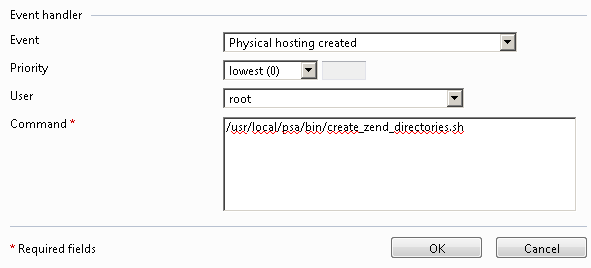
In Plesk 9, go to Home > Event Manager and add an event for “Physical Hosting Created”.
In Plesk 8, go to Server > Event Manager > Control Panel Group and add an event for “Physical Hosting Created”.
On each occasion, let the event point to the command: /usr/local/psa/bin/create_zend_directories.sh. It should look similar to this.
Now SSH to your server, and create the file /usr/local/psa/bin/create_zend_directories.sh. Then copy/paste the following into that file.
#!/bin/bash
# Logging first
echo “-–-–-–-—” » /tmp/event_handler.log
echo “-–-–-–-—” » /tmp/event_handler.log
echo “-–-–-–-—” » /tmp/event_handler.log
/bin/date » /tmp/event_handler.log
/usr/bin/id » /tmp/event_handler.log
# Doing the necessary stuff
# 1) make the Zend directories
/bin/mkdir /var/www/vhosts/$NEW_DOMAIN_NAME/application
/bin/mkdir /var/www/vhosts/$NEW_DOMAIN_NAME/library
echo " -– Directories created in /var/www/vhosts/$NEW_DOMAIN_NAME" » /tmp/event_handler.log
# 2) change ownership
/bin/chown $NEW_SYSTEM_USER:psaserv /var/www/vhosts/$NEW_DOMAIN_NAME/application
/bin/chown $NEW_SYSTEM_USER:psaserv /var/www/vhosts/$NEW_DOMAIN_NAME/library
echo " -– Ownership changed for directories in /var/www/vhosts/$NEW_DOMAIN_NAME" » /tmp/event_handler.log
# 3) add custom vhost.conf file
echo “<Directory "/var/www/vhosts/$NEW_DOMAIN_NAME/httpdocs">” » /var/www/vhosts/$NEW_DOMAIN_NAME/conf/vhost.conf
echo " php_admin_value open_basedir none" » /var/www/vhosts/$NEW_DOMAIN_NAME/conf/vhost.conf
echo " Options +All" » /var/www/vhosts/$NEW_DOMAIN_NAME/conf/vhost.conf
echo " AllowOverride All" » /var/www/vhosts/$NEW_DOMAIN_NAME/conf/vhost.conf
echo " Order allow,deny" » /var/www/vhosts/$NEW_DOMAIN_NAME/conf/vhost.conf
echo " Allow from all" » /var/www/vhosts/$NEW_DOMAIN_NAME/conf/vhost.conf
echo “” » /var/www/vhosts/$NEW_DOMAIN_NAME/conf/vhost.conf
echo " -– Vhost.conf written in /var/www/vhosts/$NEW_DOMAIN_NAME/conf/vhost.conf" » /tmp/event_handler.log
# 4) run the custom websrvmng plesk utility
/usr/local/psa/admin/bin/websrvmng -av
echo " -– Running the websrvmng -av" » /tmp/event_handler.log
# 5) reload the apache config
/etc/init.d/httpd reload
echo " -– Reloading apache" » /tmp/event_handler.log
# 6) be happy, it’s done
echo “END” » /tmp/event_handler.log
/bin/date » /tmp/event_handler.log
Make it executable.
chmod +x /usr/local/psa/bin/create_zend_directories.sh
Now create a new domain in Plesk, and watch your /tmp/event_handler.log for the changes!
For more information, have a look at Parallel’s documentation on Adding Event Handlers in Plesk .