A while back, Microsoft announced it would ship updates to both its RDP client & server components to resolve a critical security vulnerability. That rollout is now happening and many clients have received auto-updates for their client.
As a result, you might see this message/error when connecting to an unpatched Windows server:
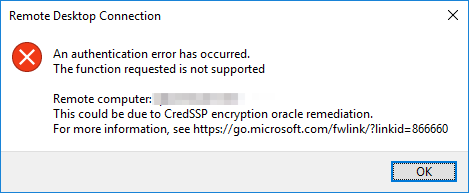
It refers to CredSSP updates for CVE-2018-0886 , which further explains the vulnerability and why it’s been patched now.
But here’s the catch: if your client is updated but your server isn’t (yet), you can no longer RDP to that machine. Here’s a couple of fixes;
- Find an old computer/RDP client to connect with
- Get console access to the server to run the updates & reboot the machine
- Temporarily tell your client to allow the vulnerable connection again
That third option is the quick one if you just need to get in and patch the server. On the client, set the AllowEncryptionOracle policy back to vulnerable:
reg add HKLM\Software\Microsoft\Windows\CurrentVersion\Policies\System\CredSSP\Parameters /f /v AllowEncryptionOracle /t REG_DWORD /d 2
(Or via Group Policy: Computer Configuration > Administrative Templates > System > Credentials Delegation > Encryption Oracle Remediation, set to Vulnerable.)
This re-opens the exact hole CVE-2018-0886
patched, so it’s a stopgap only: get in, patch & reboot the server, then set the value back to 1 (or delete it). Don’t leave a client sitting at 2.