Slow login/DNS via Active Directory on OSX Mavericks and Yosemite (.local domains)

Mattias Geniar, Wednesday, November 12, 2014 - last modified: Thursday, November 13, 2014

On a Mac OSX (Mavericks or Yosemite) you can experience very slow logins when the Mac is joined to a Windows Domain, and you're not on-site. The Offline Accounts will eventually log in, after a 2-3minute delay on the login screen.

The issue is a conflict with Apple's Bonjour service, which uses a variety of .local DNS names for auto-discovery of service on the local network. And since Active Directory also uses .local domains, they can collide ...

The logins are fast when you're in the company network, as the DHCP server will give you a DNS resolver that handles the .local suffix just fine. However, at home, you'll notice the delays ...

Fixing the .local DNS resolving

The fix is relatively easy and won't break anything. You can add the ".local" DNS search domain on your network adapter used at home. If you're going wireless at home, add it in the Advanced Network settings for your WiFi adapter.

Go to System Preferences > Network.
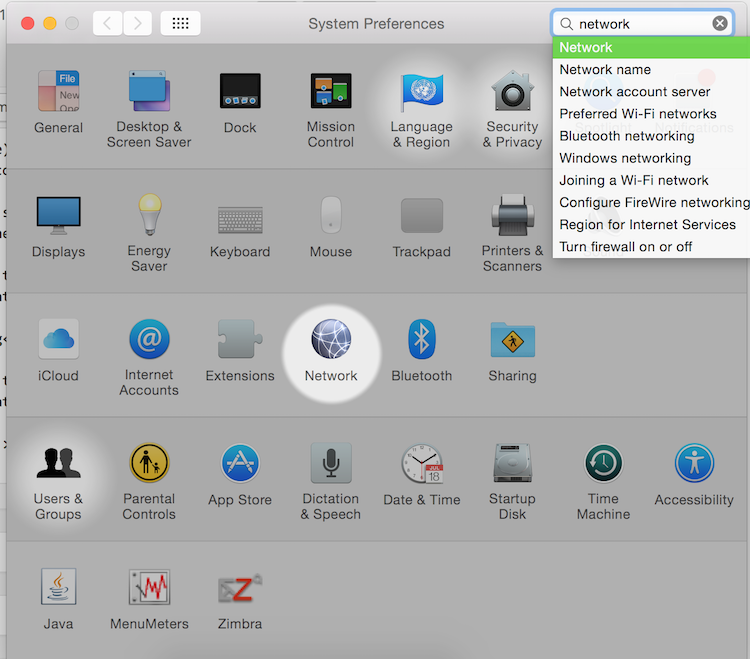
Mac OSX Network Settings

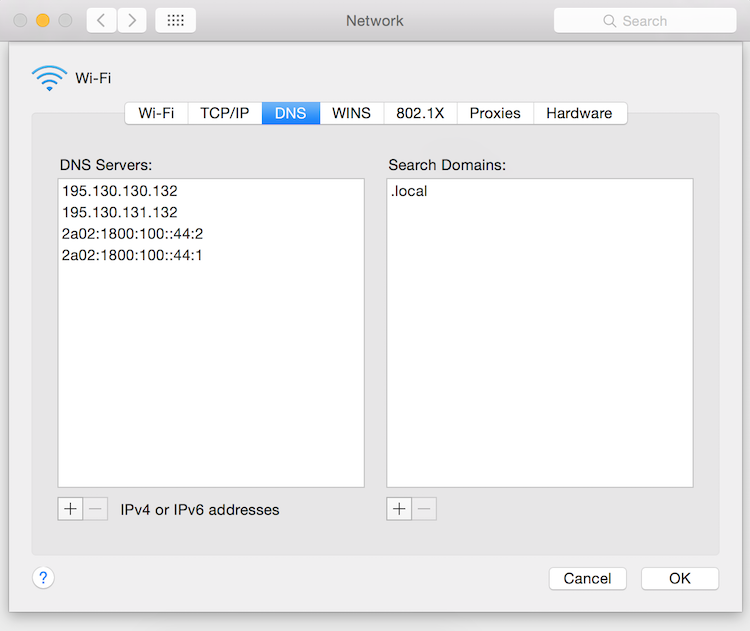
Select your Network Adapter used at home, click on Advanced in the bottom right corner. On the new screen, select the DNS tab (3rd tab at the top) and add the ".local" domain in the search domains.

Mac OSX Network Settings .local Search Domain

Leave your nameservers intact, just add the .local search domain. Next time you log on or off, you should notice a serious speed increase. This should be done on the Network Adapter used at home. If you're on the cable _and_ WiFi, add the .local search domain to both adapters.


Hi! My name is Mattias Geniar. I'm a Support Manager at Nucleus Hosting in Belgium, a general web geek, public speaker and podcaster. If you're interested in keeping up with me, have a look at my podcast and weekly newsletter below. For more updates, follow me on Twitter as @mattiasgeniar.

I respect your privacy and you won't get spam. Ever.
Just a weekly newsletter about Linux and open source.

SysCast podcast

In the SysCast podcast I talk about Linux & open source projects, interview sysadmins or developers and discuss web-related technologies. A show by and for geeks!

cron.weekly newsletter

A weekly newsletter - delivered every Sunday - for Linux sysadmins and open source users. It helps keeps you informed about open source projects, Linux guides & tutorials and the latest news.

Share this post

Did you like this post? Will you help me share it on social media? Thanks!

Comments

Trouble Thursday, November 13, 2014 at 09:43

Won’t that break multicast DNS and services which actually rely on it?

I surprised that you get a resolver that resolves .local. Usually those names are resolved by mDNS. Perhaps the real issue is that your Microsoft domain is using .local names in the first place. I expect that if it were to use a name resolved through regular DNS, whatever is being looked up would quickly result in NXDOMAIN and whatever is looking for it would give up.

On another note: you may find networksetup(8) handy… Particularly the ‘locations’ feature. You can also access it via the GUI but I find scripts a lot easier!

Reply


    Mattias Geniar Thursday, November 13, 2014 at 11:59

    It probably will, but I’ve not discovered any downsides of it yet – and it’s been running over a week like this now. Perhaps I don’t use many multi-cast services, so I won’t notice …

    You are indeed right: the “cleanest” fix is to have a Active Directory domain that’s actually a Fully Qualified Domain Name (FQDN), so it can resolve properly. However, changing an already-functioning Active Directory domain is – to my limited knowledge – not very easy, as it requires all members of the domain to change their Domain configs as well.

    Either way, this worked in my case.

    Reply


Leave a Reply

Your email address will not be published. Required fields are marked *