Oh boy, another update to WordPress , another set of changes to the WordPress core to prevent WordPress from changing the default double dash and single quote characters to the “pretty” HTML versions ’, ‘, –, —, …
When posting snippets of source code or command line arguments, having the quotes and dashes replaced makes copy/pasting the commands a pain, as your terminal won’t recognise them.
The modern way (WordPress 4.0+): don’t touch core at all. WordPress added a run_wptexturize filter that lets you switch the whole wptexturize() behaviour off. Drop this in your theme’s functions.php or, better, a small functionality plugin so it survives theme changes too:
add_filter( 'run_wptexturize', '__return_false' );
That’s it. No core files to re-patch after every update. If you only want to skip the texturizing for certain tags, the no_texturize_tags filter lets you tune which tags (pre, code, kbd, …) get left alone.
The rest of this post is the original 2012 approach, which edited a core file directly. Don’t do this on a site you still update, as the change is wiped on every WordPress upgrade. It’s kept here for posterity.
So, if you wanted to fix that in WordPress 3.3, you’d edit the /wp-includes/formatting.php file and go to around line 61. You’ll see something like this.
function wptexturize($text) {
....
$static_characters = array_merge(...
$static_replacements = array_merge(...
$dynamic_characters = array(...
$dynamic_replacements = array(...
...
}
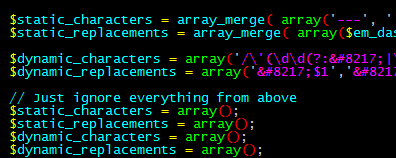
Right below those 4 PHP variables, add the following lines.
// Just ignore everything from above
$static_characters = array();
$static_replacements = array();
$dynamic_characters = array();
$dynamic_replacements = array();
That simply overwrites whatever WordPress had defined to be replaced, to leave it at the default HTML characters.
If you’ve done that above, the file should look similar to the screenshot below.
And afterwards, the dashes shouldn’t be replaced anymore!