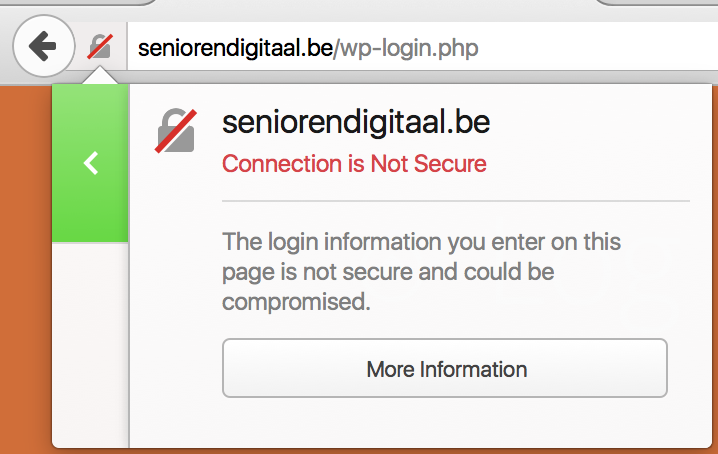
tl;dr: if your site has any kind of login section, you'll want to switch to HTTPs. You should have done so a long time ago (security, privacy), but now Firefox is giving you even more of an incentive to do so.
This tweet brought it to the attention:
PSA: In Firefox 44 Nightly, "http:" pages with <input type="password"> are now marked insecure. pic.twitter.com/qS9LxuRPdm
— Richard Barnes (@rlbarnes) October 20, 2015
If you have a form on your website where one of the fields is of the type="password", the page will now be marked as insecure in your browser if it is served over a plain HTTP connection.
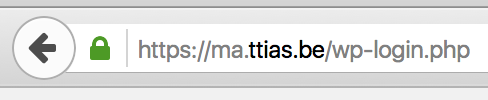
Here's what a normal, secure, page looks like with a type="password" input field.
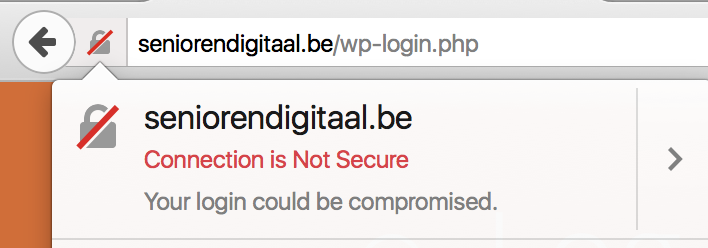
And here's the new Firefox Nightly display of a similar page, but in plain HTTP (with a shameless plug to Senioren Digitaal, offering IT classes to elderly people).

This change, once it makes it to the mainline version of Firefox (current Firefox is at version 41, nightly is at version 44), will make users even more aware of the dangers of submitting passwords to a plain HTTP website.
Every HTTPS/TLS connection can already show you more information in the security panel in Firefox. This warning is shown on plain HTTP connections where there is no Security Panel in the inspector.
If you hover over the warning, you'll see more information on why the red indicator is shown.

This move from Firefox comes after several discussions of marking HTTP connections as insecure by default. I believe it's good UX to only show the insecure icon on pages where it actually makes a difference.
Yes, HTTPs everywhere would be a good idea. Privacy and eavesdropping are among the most important motivators. Security is a very nice side-effect.
But since not every website has a login section where passwords can be stolen, marking all HTTP connections as insecure wouldn't be a good idea. It would just train users to see a red indicator in the upper left corner and consider that the new normal.
We've now got several ways of marking a connection as insecure, besides the usuals (expired SSL, invalid hostname, ...) in multiple browsers:
- Password-fields in a plain HTTP site
- SHA-1 SSL certificates which expire after 2015
What are your thoughts on this?
Comments
diffra Wednesday, October 21, 2015 at 16:59 -
This makes no sense. If the form ACTION is https, it’s secure. The transport for the page with the login box is irrelevant.
Šime Vidas Wednesday, October 21, 2015 at 18:09 -
That form is on a non-HTTPS page, which means an attacker can edit it (change the action value) or inject JavaScript that intercepts the user’s password.
John Abassian Friday, October 23, 2015 at 19:26 -
There’s no good reason to ever have a site be partially secured. If you can secure what the form posts to, why is the form not served on a secure page as well?
By serving it on plain http, it becomes an easy target for man in the middle attacks, someone can inject javascript to intercept the data before it posts, or even replace the entire form with a malicious copy that posts to a malicious server.
Ross Wednesday, October 21, 2015 at 22:55 -
How will this affect pages where the password field may be dynamically created after the page has loaded? What about pages that make use of a password field for non-password related things(like html tutorials or something else)?
Mattias Geniar Thursday, October 22, 2015 at 10:39 -
It seems to inspect the live DOM, if you modify a form field in the Inspector, the icon changes as soon as it’s the
type="password". So injected forms via JavaScript have the same effects.As for pages that offer HTML tutorials: the browser does not distinguish between a tutorial or a live site. If any site, by example or for real, has a
type="password"form field, it’ll be marked as insecure in Firefox unless it is served via HTTPS.name Thursday, October 22, 2015 at 14:36 -
Perhaps it should simply not allow forms with a type=”password” to be submitted over HTTP without going through a big, scary, annoying page/popup/alert where one must click at least one, if not 2 to 3 buttons, to continue.
svenn Thursday, October 22, 2015 at 17:36 -
This will make sense once lets encrypt is live for a few years and people can actially have certificates the easy way, now the only free & easy way is self signed (1). This gives you a dirty error page. (That in itself is stupid, as if http is more secure then https with self signed)
So while the intention is good, it will make another generation of “ignoring warning users”. Such as today we have “next next next install next” and “yes, I accept cookies” and one we all do “yes, I have read and agreed these terms”.
1) I know startssl, still its allot of workload for nothing.
Mattias Geniar Thursday, October 22, 2015 at 17:37 -
Well said, I can only agree with all your arguments.
ミク Friday, October 23, 2015 at 10:59 -
And if you aren’t using the password field for anything other than masking the input?
You might have a case for not caring about how it’s transmitted. Suddenly your page is marked as insecure for just wanting to use a feature of HTML.
Marcus Bointon Friday, October 23, 2015 at 14:48 -
I really don’t see any good reason for doing anything without encryption now. TLS is necessary for HTTP/2 (yes, the spec allows it without, but no browsers do), so you need encrypted connections to get the best performance anyway, even if you have no particular need for the security/privacy benefits. I’ve been using HSTS for a couple of years, I see no advantage in serving anything over plain HTTP any more.
AnonymousCoward Saturday, October 24, 2015 at 13:40 -
What about HTTP pages hosting HTTPS iframes? I can think of one airline (Tunisair) that does this for entering credit card details. One field in the form of the iframe is a password input, so would this trigger the insecure warning?
Mattias Geniar Saturday, October 24, 2015 at 23:31 -
If the iframe is HTTPs, and it’s the iframe that contains the password input fields, there won’t be an “insecure” marker in the browser. At the same time, even though the iframe is HTTPS, there also won’t be a “secure” icon in the browser – because the parent is HTTP.
Alternatively, if you are on an HTTPs site and you include a form with password-fields from an HTTP source, it will show an insecure warning about mixed content. You can test it here: https://ma.ttias.be/test/test_iframe.html
Here’s what it looks like: firefox mixed content warning.
Victor Monday, October 26, 2015 at 03:01 -
I’m not sure what to think about this feature.
If only the login page is secure, one can still steal the session cookie on any non-https page for a logged-in user. The only way to prevent this is to serve over a secure connection for logged-in users, right ? (or re-ask the password for any important actions but very few sites do that).
I’m afraid that devs would think that they have increased the security only by switching the login page to https.
Mattias Geniar Monday, October 26, 2015 at 21:43 -
I believe this is solved by setting the “secure” flag on cookies, making them only valid on HTTPs connections.
jd440 Tuesday, October 27, 2015 at 12:17 -
I still not understand this kind of warning.
Ok unsecure but what is the risk.
For example, for an e-shop where transaction go through bank website which is is https.
What is the risk?
Pirate could connect to his account and :
– see order
– See Adress
???
But is it such big risk, there no credit card number, or fraud possible?
Mattias Geniar Tuesday, October 27, 2015 at 15:04 -
In a plain HTTP site, it’s much easier to man-in-the-middle the response from the server and alter it. That could mean that the POST request for the payment no longer goes to the real bank or payment site, but to a faked phishing page that stores the credit card details.
Such an attack is made a lot more difficult (but not impossible) on HTTPs.
jd440 Wednesday, October 28, 2015 at 11:47 -
Ok but which kind of MITM are your talking about?
ARP Spoofing, DNS Poisoning?
What the probability of pirate using this posibility for a website making 1~10 transaction per day?
By the way do you know which of ssl is necessary to don’t get this warning?
Mattias Geniar Wednesday, October 28, 2015 at 16:06 -
DNS poisoning in combination with a proxy setup, that allows an attacker to modify the HTML content during transit.
The probability of this happening? If you’re a large ecommerce site, chances are someone’s targetting your clients right now.
Inbound links
- Firefox 44 Starts Marking HTTP Login Forms as Insecure
- Firefox Nightly starts marking login-forms in HTTP as insecure | murze.be
- Informations sur les input Password de Firefox | Base Dévicom
- Quo Vadis Firefox ? | Webworking
- Newsletter Sécurité informatique semaine 44 - Adacis
- Web Development Reading List #109 - American Fido
- Firefox Nightly starts marking login-forms in HTTP as insecure | Brainiac
- Moving to HTTPS | Steve's Programming Blog
- Web Development Reading List #109 – Smashing Magazine